| Author | Published |
|---|---|
| Jon Marien | January 14, 2026 |
Description
CORS is a browser feature that lets a site on one origin (scheme + host + port) ask the browser for permission to read responses from a different origin, under rules defined by the target server’s CORS policy.
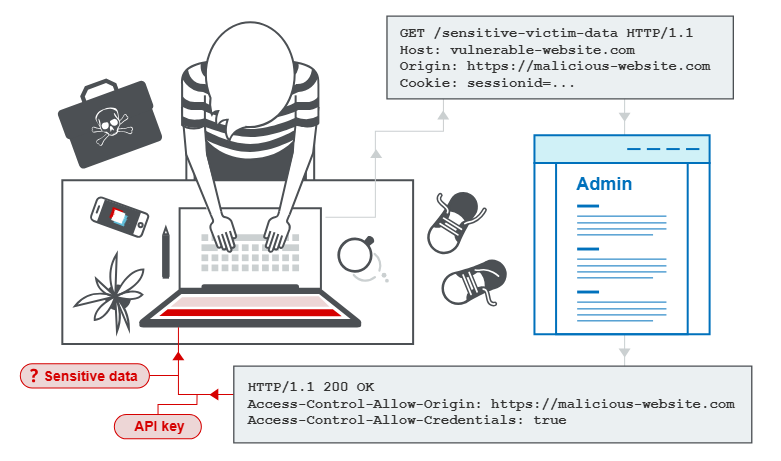
CORS – What It Is
Cross-origin resource sharing (CORS) extends the Same-Origin Policy by allowing a server to say “these other origins are allowed to read my responses,” using headers like Access-Control-Allow-Origin. It’s meant to enable controlled cross-domain access for web apps (for example, SPA front end on one domain calling an API on another), not to stop cross-origin requests themselves.
Core Idea
- Browser sends a cross-origin request and applies SOP: by default, JS cannot read the response.
- If the response includes the right CORS headers (for example,
Access-Control-Allow-Origin: https://example.com), the browser relaxes SOP and lets that origin’s JS access the response. - If CORS is misconfigured (for example, using
*or reflecting attacker-controlled origins), a malicious origin may gain access to sensitive responses.
Why It’s Bad / Impact When Misconfigured
- A poorly configured CORS policy can let an attacker’s site read authenticated responses from a victim’s browser, exfiltrating data like profile info or API responses.
- CORS does not protect against CSRF; cross-site requests still happen, CORS only governs whether JS on the attacking origin can read the response.
Protect Against It
- Be strict with allowed origins: use explicit allowlists, not
*nor dynamic reflection of arbitraryOriginheaders. - Only enable CORS on endpoints that truly need cross-origin access, and never include sensitive endpoints by default.
- Remember CORS is a relaxation mechanism, not a security control—combine it with proper authentication, authorization, and CSRF defenses.