| Author | Published |
|---|---|
| Jon Marien | December 18, 2025 |
Definition
Access control is the constraints on an application on who or what is authorized to perform actions or access resources. In the context of web apps, access control is dependent on the authentication and session management:
- Authentication confirms who they are.
- Session management identifies which subsequent HTTP requests are being made by that same user.
- Access Control determines whether the user is allowed to carry out the action that they are attempting to perform.
Broken Access Controls are very common and present (often) a critical security vulnerability. The design and management of these controls are a complex and dynamic problem.
Vertical Privilege Escalation
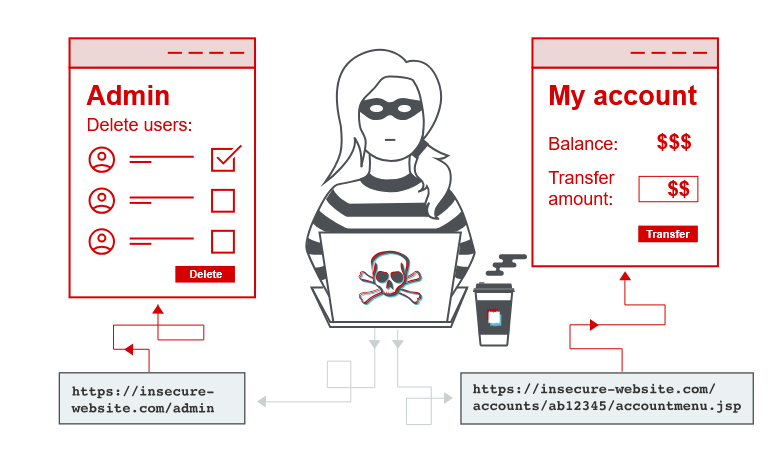
If a user can gain access to function that they are not permitted to access, then this is vertical privilege escalation. For example, if a non-admin user can gain access to an admin page where they can delete user accounts, then this is vertical privilege escalation.
Unprotected function(ality)
Vertical Priv. Esc. usually shows itself when a web-app does not enforce any protection for sensitive functions. For example, admin functions linking only from admin pages, but not user pages. But somehow, the user can access the admin functions just by browsing to the URL, since there are no user/password protections on it.
For example, https://insecure-website.com/admin could be visited just by trying the page.
And where might you find these pages, other than trying common paths?
Well, the https://insecure-website.com/robots.txt page usually has to disclose which paths to not crawl. And as such, you should check those paths!
You could also brute-force these paths.
In some cases, sensitive functions are concealed by giving it a less “predictable URL”. This is an example of so-called “security by obscurity”. Doing it this way does not really provide effective Access Control because users might discover the obfuscated URL in any number of ways.
Imagine the same administrative-panel URL but with this “less predictable URL”:
https://insecure-website.com/administrator-panel-yb556
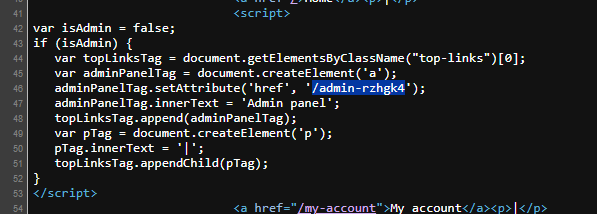
This might not be directly guessable by an attacker (and not in robots.txt). The URL might be disclosed in JavaScript that constructs the user interface based on the user’s role:
<script>
	var isAdmin = false;
	if (isAdmin) {
		...
		var adminPanelTag = document.createElement('a');
		adminPanelTag.setAttribute('href', 'https://insecure-website.com/administrator-panel-yb556');
		adminPanelTag.innerText = 'Admin panel';
		...
	}
</script>
This script adds a link to the user’s UI if they are an admin user. Although the script containing the URL is visible to all users regardless of their role.
Parameter Based Access-Control Methods
Some applications determine the user’s access rights or role at login, and then store this information in a user-controllable location. This could be:
- A hidden field.
- A cookie.
- A preset query string parameter.
The application makes access control decisions based on the submitted value. For example:
https://insecure-website.com/login/home.jsp?admin=true
https://insecure-website.com/login/home.jsp?role=1
This approach is insecure because a user can modify the value and access functionality they’re not authorized to, such as administrative functions.
Horizontal Privilege Escalation
- If a user is able to access resources that they’re not supposed to. So, if your ID is 123, you can enumerate through them and do ID 124 or 125, and maybe that has an admin access in that user. This is also an example of an IDOR vulnerability, which is an insecure direct object reference.
- In some applications, you cannot predict the value of the exploitable parameter. For example, some applications instead of incrementing numbers, they might use something called a global unique identifier, which is a GUID. These cannot be enumerated as easily as normal numbers, but they can still be enumerated if you know what is going on.
- The lab was solved by finding a blog post written by a certain author and then clicking on their profile. Then, looking in the URL for their GUID, and when you go to my account, you basically replace your GUID with the GUID that you found for
carlos, and then you can access his profile, and receive the API key for the solution.
Horizontal to Vertical Privilege Escalation
-
So when talking about horizontal and vertical privilege escalation, the two are quite similar because not in the way that they actually are but in the way that they are able to be accessed.
-
For horizontal escalation, you can have an attacker reset or capture the password belonging to another user. If the attacker targets an admin user and compromises their account, they can gain admin access.
-
So instead of just using the parameter tampering technique from horizontal privilege escalation and enumerating the number.
- For vertical escalation, if you enumerate through the number and end up on an application administrator, then you have vertical privilege escalation.
-
For the lab, this one was solved by retrieving the administrator’s password and then using it to delete the user Carlos.
So what we did was we changed the ID parameter in the URL from Weiner or Carlos to administrator and then we clicked on the reset password button with the intercept on so we could see what the data was for the password field. Then we copied the password field, logged out of the other users, and logged into the administrator account. That allowed us to get access to the administrator panel and delete the user Carlos.